
Introduction: The Gap in PowerPoint’s Capabilities
PowerPoint is the go-to tool for creating presentations, used by millions across industries to communicate ideas, pitch solutions, and educate audiences.
Yet, for professionals in operations, engineering, sales, and education, PowerPoint falls short when it comes to creating precise, technical diagrams.
Traditional computer-aided design (CAD) software is powerful but complex, requiring specialized skills and significant time investment.
This white paper explores why PowerPoint needs CAD-lite tools, the streamlined solutions that bring technical drawing capabilities into the presentation workflow, and how they bridge the gap for professionals needing accuracy without complexity.
The Limitations of PowerPoint for Technical Diagramming
PowerPoint’s built-in shapes and drawing tools are adequate for basic visuals but lack the precision required for technical applications. Key limitations include:
- No Scaling or Measurement Support: PowerPoint doesn’t natively support scaled drawings or unit conversions, making it impossible to create accurate technical diagrams.
- Manual Alignment Challenges: Positioning and aligning shapes for complex layouts is time-consuming and error-prone.
- Inconsistent Outputs: Without standardized tools, diagrams vary in quality, undermining professional credibility. These gaps force users to rely on external CAD software or makeshift workarounds, disrupting workflows and increasing costs.
The Challenges of Traditional CAD Software
While CAD software like AutoCAD or SolidWorks excels at technical design, it’s overkill for presentation-focused diagramming. Challenges include:
- Steep Learning Curve: CAD tools require extensive training, inaccessible to non-engineers like salespeople or operations managers or educators.
- High Costs: Licenses and subscriptions are expensive, often unjustifiable for occasional use.
- Workflow Disconnect: Exporting CAD drawings to PowerPoint involves multiple steps, risking formatting and scale issues and version control problems.
- Time Inefficiency: Creating a simple diagram for a presentation takes hours in CAD, diverting focus from core tasks. These barriers highlight the need for a middle ground—a tool that offers CAD-like precision within PowerPoint’s familiar interface.
- Hard To Share: Trying to share DWG files means that recipients need CAD viewers installed and need to know how to navigate them.

What Are CAD-Lite Tools?
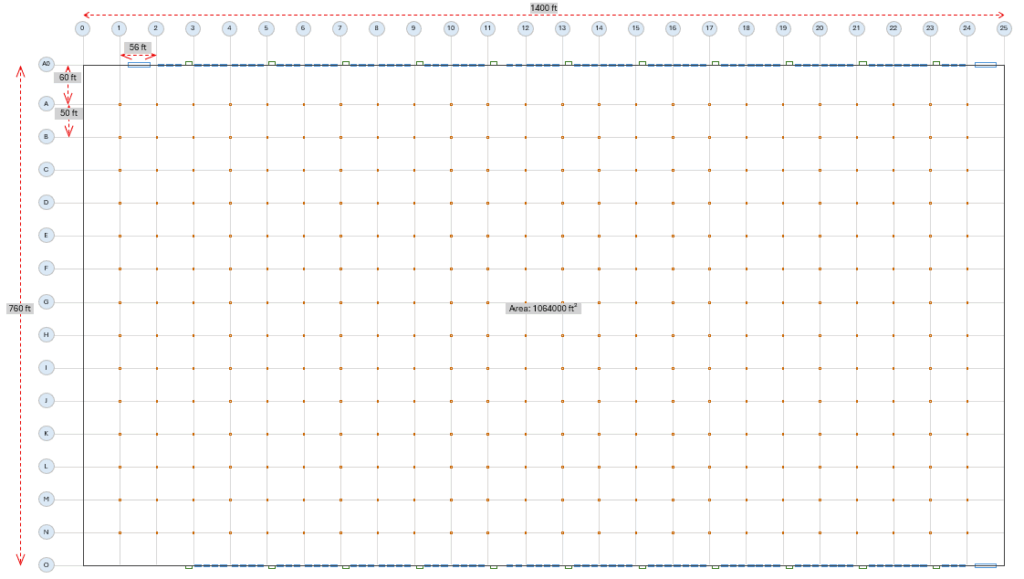
CAD-lite tools integrate simplified technical drawing capabilities into PowerPoint, enabling users to create scaled, accurate diagrams without leaving the platform. Key features include:
- Scaled Drawing: Support for real-world measurements and unit conversions.
- Precision Tools: Automated alignment, arrays, and dimensioning for consistent outputs.
- Ease of Use: Intuitive interfaces that require minimal training, accessible to non-CAD experts.
- Seamless Integration: Native compatibility with PowerPoint, preserving slide aesthetics and collaboration features. CAD-lite tools empower users to produce professional-grade diagrams for applications like process flows, equipment layouts, or educational schematics, all within a single workflow.
- Easy to Share: Most business users have Powerpoint. Few have CAD or CAD file viewers. Send files in an easily understood, easily-opened format for quick communication.
Who Needs CAD-Lite Tools?
CAD-lite tools serve a diverse audience:
- Operations Professionals: Create accurate process diagrams or facility layouts for internal reviews.
- Engineers: Communicate technical concepts to non-technical stakeholders without full CAD software.
- Sales Teams: Build compelling visuals for client proposals, showcasing precise layouts or product designs.
- Educators: Develop clear, scalable diagrams for teaching complex concepts in STEM fields. These users share a need for precision and simplicity, making CAD-lite tools a game-changer for their presentation workflows.
Benefits of CAD-Lite Tools in PowerPoint
Integrating CAD-lite functionality into PowerPoint offers transformative benefits:
- Efficiency: Create technical diagrams in minutes, not hours, directly within PowerPoint.
- Cost Savings: Eliminate the need for expensive CAD licenses or external design services.
- Accessibility: Empower non-technical users to produce professional diagrams without specialized training.
- Consistency: Standardized tools ensure uniform quality across presentations.
- Enhanced Communication: Precise visuals improve clarity, boosting stakeholder engagement and decision-making. By addressing PowerPoint’s limitations, CAD-lite tools streamline workflows and elevate presentation quality.
SimpleDim: Leading the CAD-Lite Revolution
SimpleDim is a PowerPoint add-in designed to fill this gap, offering CAD-lite functionality tailored for technical diagramming.
With features like scaled drawing, unit conversions, and automated alignment, SimpleDim enables users to create accurate diagrams effortlessly. Its intuitive interface ensures accessibility for all skill levels, while seamless PowerPoint integration preserves collaboration and formatting.
Whether you’re an operations manager laying out a processing area or a salesperson illustrating a product layout, SimpleDim delivers precision without complexity, redefining what PowerPoint can do.
Conclusion: Bridging the Gap with CAD-Lite Tools
PowerPoint is a powerful platform, but its limitations in technical diagramming have long frustrated professionals. CAD-lite tools like SimpleDim bridge this gap, bringing precision, efficiency, and accessibility to presentation workflows. By enabling scaled, accurate diagrams within PowerPoint, these tools empower operations, engineering, sales, and education professionals to communicate with clarity and impact.
As the demand for versatile tools grows, CAD-lite solutions will redefine PowerPoint’s role, making it an essential asset for technical and creative tasks alike. Explore SimpleDim today and unlock PowerPoint’s full potential.