
PowerPoint Add-In For Supply Chain, Consulting, And Anywhere A Plan Is Needed,
PowerPoint Drawing Software for Pro Layouts in Minutes.
Get layouts and drawings done faster and cheaper, and share with your teams.
You can create professional facility layouts, process diagrams, and to-scale drawings in minutes without expensive CAD software or steep learning curves.
✓ 95% cheaper than CAD
✓ Easy-to-use, easy-to-share
✓ For Operations, Sales, Project Managers, and Consulting
Great how you guys fill the gap between PowerPoint and AutoCAD – have been looking for years!
Everyday Users Need Good Drawings, But CAD Is Overkill
Too Expensive
$$$$ per license means companies don’t buy licenses for many non-engineers. But they’re often the ones doing layouts, sometimes in Excel!
Hard To Share
Want to collaborate? Most people don’t have CAD, so sharing drawings is hard. This slows down collaboration and delays projects.
Hard To Learn
Need to do a layout now? CAD programs have a steep learning curve. But you don’t have months to get good at CAD. You need a layout now.
I wanted to use PowerPoint to illustrate changes to scale within a portion of a CAD drawing to present but the issue I ran into was accurate scaling, […] to set the scale and ensure the items being inserted were to scale of the original CAD file. SimpleDim provided the ability to do so with just an add on to PowerPoint and it was very user friendly to attain the desired results.”
SimpleDim Brings CAD Capabilities To Every Powerpoint User
How often have you had to wait for “the guy with CAD” to do your drawings? Wouldn’t it be faster and easier to get the drawings done yourself and make the changes you need?
SimpleDim is the Powerpoint add-in that lets every operations manager, supervisor, or supply chain consultant do precise layouts and drawings without CAD.
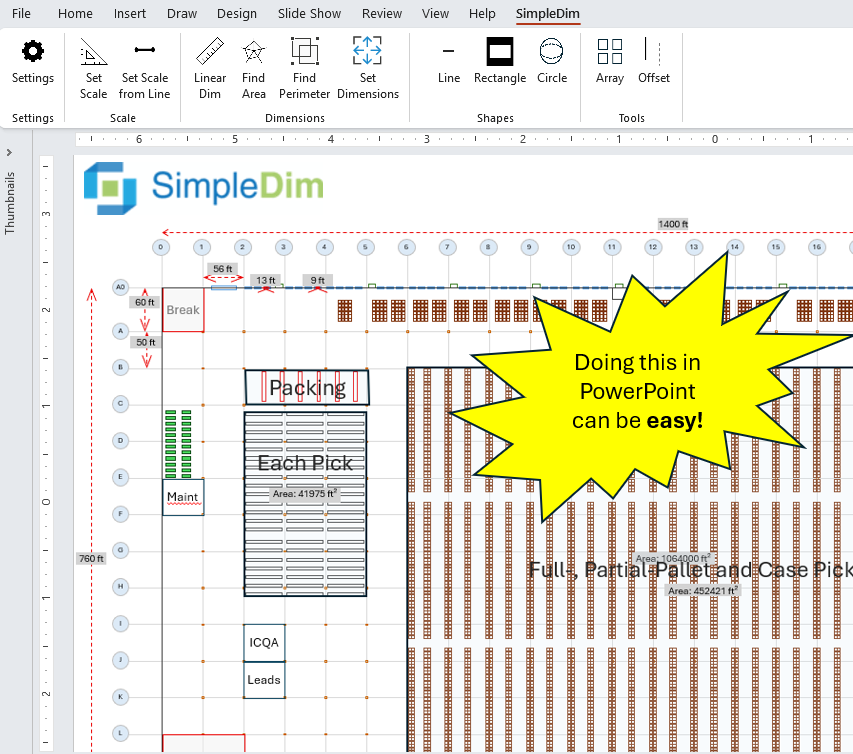
Create professional, accurate, scaled and dimensioned drawings and diagrams with sophisticated CAD-lite tools in the familiar and easy-to-use Powerpoint app.
- Choose your exact scale, like 1:10, 1:50, 1:200….
- Set your units in Imperial and Metric units. Handles Inches, Feet, Yards, Millimeters, Centimeters, Meters, Kilometers, and Miles.
- Create shapes to the dimensions and units you want
- Find lengths and areas quickly and easily
- Use professional functions like shape Arrays, Mirror, and Offset for repetitive parts like racking, docks, and pick areas
Then share them with your teams in familiar .PPT files they can read and use.
Draw With Right Scale & Units
Choose the right scale for the detail you need to draw. Explore how to set 1:N scales with the right units on your slides.
Find Dimensions without Hand Calcs
Stop calculating distances and areas on slides by hand. Find distances and areas of common or freeform shapes.
Draw Like A Pro CAD User
Powerpoint can’t do this:
Basic drawing shapes, arrays, and offset for to-scale drawings and repetitive shapes.
The #1 PowerPoint Drawing Software For Supply Chain and Consulting. Here’s why:
From Concept To Layout, Fast
- Go from Concept to Plan with clients or ops teams on-the-spot
- No more waiting for engineering availability to make what you want
- Helps users understand real space use and flow
- Powerpoint slides make sharing designs and exec updates easy
Draw With Familiar Powerpoint Interface
- Simple, intuitive, guided tools in Powerpoint ribbon
- Become a pro user in less than 30 minutes
- Easy and fast sharing as slides or PDF
- Cut down on training and turnaround time for layouts
Made With Ops and Supply Chain Users In Mind
- Perfect for conceptual site layouts, storage, and processing areas
- Each slide can hold a different scale for different details
- Help your audience understand space use with dimensions and areas
- Copy in screenshots and drawings and overlay your concept on them
Add Powerful Capabilities To Powerpoint
- Save time with CAD professional commands like Arrays, Mirror, and Offset
- Great for operations, sales engineers, brainstorming with clients
- Easy dimensioning for clear communications
I tried SimpleDim and found it extremely helpful and easy to use. It turns out that my application was in calculating square footage from images of house floor plans. SimpleDim saved me considerable time over (re)learning a CAD program or making manual measurements.
Explore SimpleDim’s most powerful features and use cases on our Youtube channel and read more about uses and features at SimpleDim Insights.
Finish your layout today, not next week
Try SimpleDim For Yourself
Free
- No-Risk Trial – Test it out for 3 days!
- No Credit Card, only email required
- Full functionality
1-Year License
$69
- 1-year license for 2 devices
- Costs less than a billable hour, or latte per month
- Upgrades available during license period
This is Windows-Only Powerpoint desktop software. Mac/Apple devices are not supported.
How Licensing Works: Pay once for software, updates, and support during the license period. No hidden fees. One license per user, usable on two machines. Get your download and key instantly.