
Warehouse design software helps Operations managers create efficient warehouse layout designs for warehouses, distribution centers, and fulfillment centers. It’s tricky, and they have to live with the results! Traditionally, this process relies on engineers using data analysis and specialized (and expensive) CAD software like AutoCAD.
But now SimpleDim transforms this process by empowering operations teams to create accurate, scaled warehouse layouts directly in PowerPoint. Powerpoint is already used by millions. By bridging the gap between operations and engineering, SimpleDim accelerates the design process, reduces rework, and fosters seamless collaboration. This article explores how SimpleDim enhances warehouse layout design, its key benefits, and its practical applications for operations managers.
Warehouse Business And Data Analysis
Designing a warehouse begins with a thorough analysis of business needs and operational data. Operations and Engineering teams use tools like Excel, Tableau, or Alteryx to analyze order profiles, historical receiving and shipment data, product characteristics, item-master data, and forecasts. These analyses produce critical outputs such as:
- Receiving and Shipment Profiles: Understanding inbound and outbound logistics patterns.
- Customer and order profiles: Mapping customer types and how orders are placed.
- Storage and cube profiles: Determining inventory dimensional space-use drivers and storage needs.
- Calendar and clock profiles: Determining seasonality and time-of-X(hour, day, week, month) impacts.
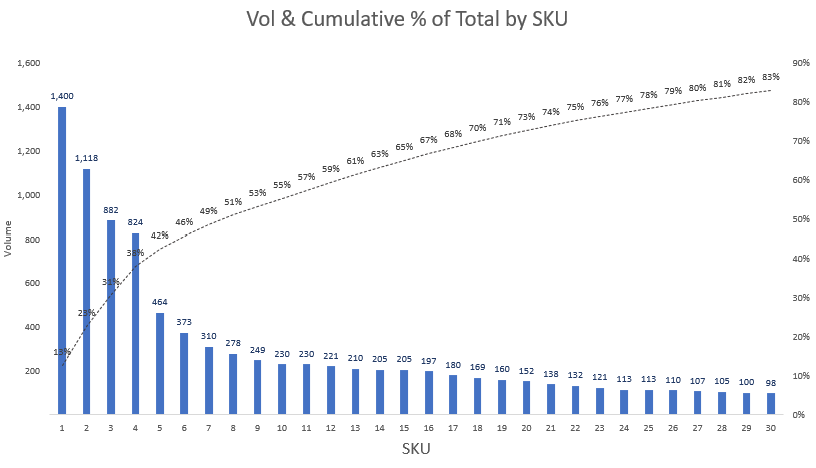
These basic data points form the foundation for the next step: creating a process flow diagram. This diagram outlines the operational processes—such as receiving, storage, picking, and shipping—and their interactions within the warehouse. It serves as the first high-level visualization of how the facility will function.
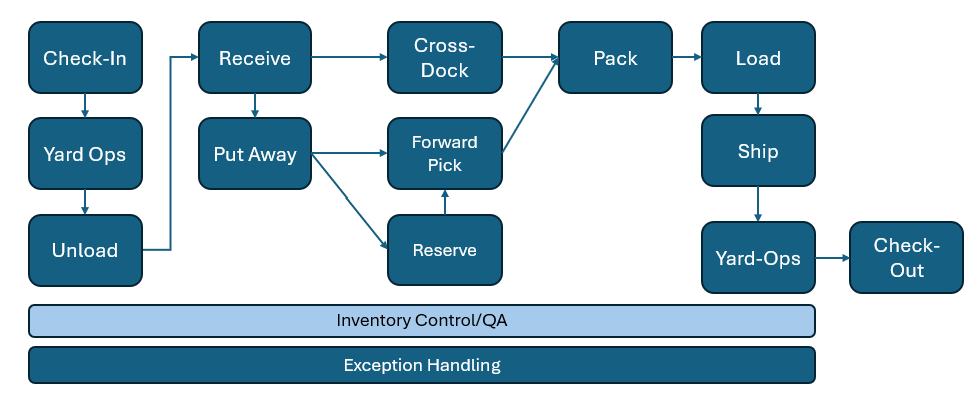
Once the process flow is defined, operations teams develop a block layout which overlays it onto a building shell. This layout ensures that the building’s flow is logical, space is sufficient, and the design aligns with operational needs before moving to detailed engineering drawings.
A block layout brings the process flow to the building shell. The type of building flow is identified. It can show whether a building has a U-shaped flow, I-shape / straight-through, or hybrid model. Processing area adjacencies and sizes can be defined. The plan must make sense. For example, receiving should be adjacent to storage, forward picking to reserve storage, and packing near shipping.
Further detail can go in the next level of design. Drawings can ensure that racking is on the walls, give directionality and size of pick and travel aisles, and other next-level-down details. Even reserve storage and A/B/C SKU slotting can be defined at a plan level.
However, creating accurate layouts in PowerPoint is challenging due to its lack of scale and unit tools. This prevents accurate drawings and leads to lots of back-and-forth with engineering teams.
The Power of SimpleDim in Warehouse Layout Design
SimpleDim addresses these challenges by bringing CAD-like capabilities to PowerPoint. It enables operations managers to create precise, scaled block layouts without relying solely on engineering teams. CAD software can cost thousands of dollars annually, but SimpleDim is cost-effective and leverages PowerPoint’s accessibility. This makes it an ideal tool for operators, engineers, or others who need to make layouts without CAD.
This is often done in a basic tool like Powerpoint. But what Powerpoint lacks on its own is the ability to do properly sized areas. So people will often just drop shapes in the shell and leave it to the engineers to see if they fit later. This can cause a lot of back-and-forth as Operations looks over the engineering iterations and makes adjustments to them.
Wouldn’t it be simpler if Operations could bring something to Engineering, or Engineering could make changes on-the-fly, live, in meetings?
A better way is to use a tool like SimpleDim to scale and include required areas from the beginning.
How Dimensioned And Scaled Drawings Can Help
SimpleDim equips PowerPoint with tools to streamline warehouse layout design:
- Set Scale From Line Tool: Define a scale (e.g., 1 inch = 100 feet) by selecting a known distance on the slide, ensuring all shapes and lines are accurately proportioned.
- Unit Selection and Conversion: Choose units like feet, meters, or yards, with adjustable precision for clear measurements.
- Measurement Tools: Use Find Area and Linear Dimension tools to calculate distances and areas in real-world units, eliminating manual calculations.
- Scaled Shape Drawing: Create blocks for docks, travel aisles, storage areas, maintenance zones, robotics areas, PIT parking, conveyance systems, and racking profiles with precise dimensions.
These features enable operations teams to draft layouts that are both visually clear and technically accurate, reducing the need for back-and-forth with engineering.
SimpleDim can help you create useful scaled block diagrams and even go a level deeper. With being able to set a scale, then draw blocks with precise dimensions, you can see what your layout will look like with realistically-sized areas like:
- Docks
- Travel aisles
- Storage areas
- Maintenance areas
- Robotics areas
- PIT parking
- Conveyance and sorter runs and obstructions
- Even racking profiles!
Being able to do them live, in a tool that can be used by Operations as well as Engineering will save hours or weeks in a design process.
Practical Applications in Warehouse Operations
SimpleDim’s versatility makes it invaluable for various warehouse design scenarios:
- Conceptual Design: Operations managers can sketch initial layouts during client meetings or internal planning sessions, showing how equipment or processes fit within a facility. For example, a sales engineer can quickly demonstrate how a new machine integrates into a client’s warehouse. The Operations team can war-game scenarios in their own Powerpoint with a screenshot or PDF, reducing the need for meetings and back-and-forth.
- Space Planning: Accurately size docks, storage areas, and travel aisles to ensure efficient workflows and equipment compatibility.
- Process Optimization: Visualize process flows, such as picking or sorting, identify bottlenecks and optimize layouts before engineering finalizes CAD drawings.
- Stakeholder Communication: Create clear, professional diagrams for presentations to stakeholders, investors, or clients, enhancing buy-in and understanding.
For instance, consider a warehouse manager planning a new picking area. Using SimpleDim, they can set a scale, draw a column grid and racking blocks to exact dimensions, and verify space. This layout can then be shared with engineering for refinement, reducing iterations and ensuring alignment.
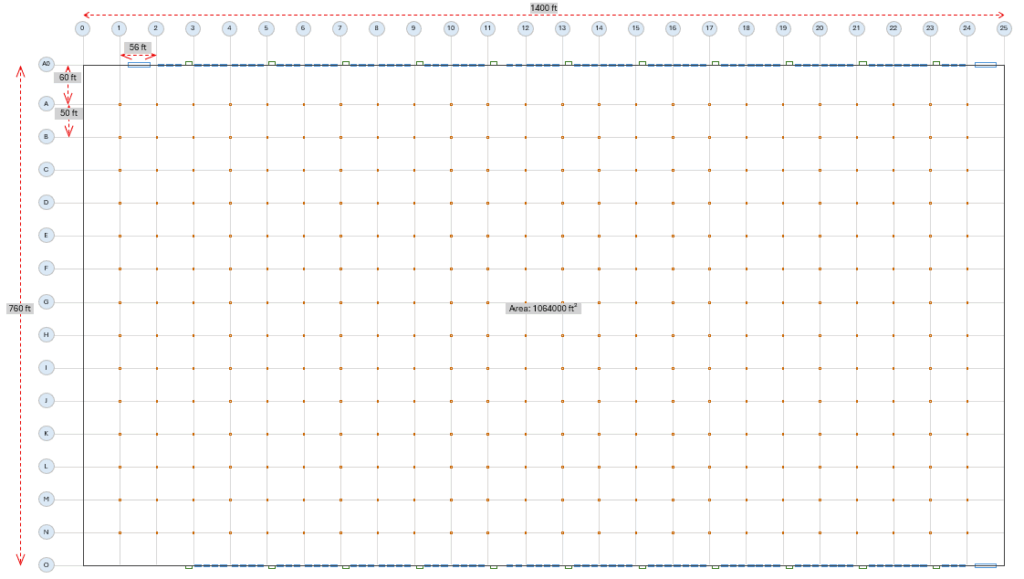
Why PowerPoint with SimpleDim Outshines Traditional CAD for Initial Design
While CAD software like AutoCAD is the gold standard for detailed engineering drawings, it’s often overkill for conceptual warehouse layouts. SimpleDim offers a “CAD-lite” solution that balances simplicity and precision, making it ideal for operations teams who need to:
- Work in a Common Tool: PowerPoint’s widespread use ensures accessibility, unlike CAD software, which requires specialized training and licenses.
- Accelerate Design Cycles: By producing accurate block layouts upfront, SimpleDim reduces the iterations needed between operations and engineering.
- Enhance Visualization: Scaled diagrams in PowerPoint are easy to share and present, improving communication with non-technical stakeholders.
This approach doesn’t replace CAD but complements it. It allows operations teams to handle initial design phases and hand off polished concepts to engineering for final detailing.
Best Practices for Using SimpleDim in Warehouse Layout Design
To maximize SimpleDim’s potential for better, faster designs, operations managers should:
- Start with Accurate Data: Ensure data inputs (e.g., order profiles, cube & item dimensions) are accurate to inform layout decisions.
- Define the Scale Early: Use SimpleDim’s scaling tool at the start to define and maintain consistency across the layout.
- Collaborate Actively: Involve engineering early by sharing SimpleDim layouts. Share the Operations vision with dimensionally accurate drawings to help Engineering understand the goals and reduce rework.
- Leverage Presentation Features: Use PowerPoint’s formatting options to enhance diagrams for stakeholder presentations, ensuring clarity and professionalism.
- Iterate Quickly: Take advantage of SimpleDim’s real-time editing to test multiple layout scenarios during planning sessions.
Conclusion
SimpleDim streamlines warehouse layout design by empowering operations managers to create accurate, scaled diagrams in PowerPoint, a tool they already know. By reducing reliance on engineering teams, accelerating drafting, and improving collaboration, SimpleDim saves time, cuts costs, and enhances design accuracy.
Whether planning a new warehouse project, optimizing a distribution center, or presenting concepts to stakeholders, SimpleDim’s CAD-lite capabilities make it an essential tool for modern warehouse operations managers.
Try SimpleDim’s free 30-day trial today to streamline your warehouse layout design process and transform how your team collaborates on facility planning.